St Teresa's Catholic Primary Academy Logo

St Teresa's Catholic Primary Academy

Pray together + Aspire together + Achieve together

  • About
    • Principal’s Welcome
    • Our Ethos & Values
    • News
    • Policies
    • Allocation of Funding
    • Governance
    • Schools Financial Benchmarking
    • School Hours
    • Inspection Reports
    • St Gabriel the Archangel CMAT
    • Admissions
    • School Performance
    • Staff
    • Gender Pay Gap Summary
    • SEND
    • Vacancies
    • Contact Us
  • Curriculum
    • Our Curriculum
    • Curriculum Framework
    • Curriculum Responsibilities
    • Early Years
      • Reception stories
      • Reception Songs
      • Keeping Healthy and Safe
      • PhunkyFoods – Parents information
      • Keeping healthy Teeth
      • Toilet training support
      • Reception Prospectus
    • PE – Sport Premium
    • Pupil Premium
    • Termly Curriculum Overviews
    • British Values
    • Wider Curriculum & Enrichment
    • Sooper Books
  • Catholic Life
  • Students
    • Google Classroom
    • Homework Help
    • Concerns / Suggestions
    • Celebrations / Successes
    • Playground Rules
    • Staying Safe Classroom
  • Parents
    • Attendance & Punctuality
    • Letters and Newsletters
    • School Meals
    • School Uniform
    • My Child’s Learning
    • Breakfast /After School Club
    • Calendar Booklets for Parents
    • Term Dates
    • School Calendar
    • Privacy Notice for Parents/Carers
    • School Nurse
  • Keeping Safe
    • Attendance
      • Absence
      • Attendance Information
    • DfE
      • Information sharing
      • Keeping Children Safe In Education
      • Prevent Strategy
      • Thresholds of Need & Support W’ton
      • Working together to safeguard children
    • Safeguarding
    • Support for Families
    • Supporting your wellbeing
    • COVID-19
      • COVID Contingency Plan
      • Living with COVID Risk Assessment
      • Bereavement Support
      • Supporting your wellbeing
  • Staff
  • Remote Learning
  • Contact
St Teresa's Catholic Primary Academy Logo
  • About
    • Principal’s Welcome
    • Our Ethos & Values
    • News
    • Policies
    • Allocation of Funding
    • Governance
    • Schools Financial Benchmarking
    • School Hours
    • Inspection Reports
    • St Gabriel the Archangel CMAT
    • Admissions
    • School Performance
    • Staff
    • Gender Pay Gap Summary
    • SEND
    • Vacancies
    • Contact Us
  • Curriculum
    • Our Curriculum
    • Curriculum Framework
    • Curriculum Responsibilities
    • Early Years
      • Reception stories
      • Reception Songs
      • Keeping Healthy and Safe
      • PhunkyFoods – Parents information
      • Keeping healthy Teeth
      • Toilet training support
      • Reception Prospectus
    • PE – Sport Premium
    • Pupil Premium
    • Termly Curriculum Overviews
    • British Values
    • Wider Curriculum & Enrichment
    • Sooper Books
  • Catholic Life
  • Students
    • Google Classroom
    • Homework Help
    • Concerns / Suggestions
    • Celebrations / Successes
    • Playground Rules
    • Staying Safe Classroom
  • Parents
    • Attendance & Punctuality
    • Letters and Newsletters
    • School Meals
    • School Uniform
    • My Child’s Learning
    • Breakfast /After School Club
    • Calendar Booklets for Parents
    • Term Dates
    • School Calendar
    • Privacy Notice for Parents/Carers
    • School Nurse
  • Keeping Safe
    • Attendance
      • Absence
      • Attendance Information
    • DfE
      • Information sharing
      • Keeping Children Safe In Education
      • Prevent Strategy
      • Thresholds of Need & Support W’ton
      • Working together to safeguard children
    • Safeguarding
    • Support for Families
    • Supporting your wellbeing
    • COVID-19
      • COVID Contingency Plan
      • Living with COVID Risk Assessment
      • Bereavement Support
      • Supporting your wellbeing
  • Staff
  • Remote Learning
  • Contact
St Teresa's Catholic Primary Academy
  • About
    • Principal’s Welcome
    • Our Ethos & Values
    • News
    • Policies
    • Allocation of Funding
    • Governance
    • Schools Financial Benchmarking
    • School Hours
    • Inspection Reports
    • St Gabriel the Archangel CMAT
    • Admissions
    • School Performance
    • Staff
    • Gender Pay Gap Summary
    • SEND
    • Vacancies
    • Contact Us
  • Curriculum
    • Our Curriculum
    • Curriculum Framework
    • Curriculum Responsibilities
    • Early Years
      • Reception stories
      • Reception Songs
      • Keeping Healthy and Safe
      • PhunkyFoods – Parents information
      • Keeping healthy Teeth
      • Toilet training support
      • Reception Prospectus
    • PE – Sport Premium
    • Pupil Premium
    • Termly Curriculum Overviews
    • British Values
    • Wider Curriculum & Enrichment
    • Sooper Books
  • Catholic Life
  • Students
    • Google Classroom
    • Homework Help
    • Concerns / Suggestions
    • Celebrations / Successes
    • Playground Rules
    • Staying Safe Classroom
  • Parents
    • Attendance & Punctuality
    • Letters and Newsletters
    • School Meals
    • School Uniform
    • My Child’s Learning
    • Breakfast /After School Club
    • Calendar Booklets for Parents
    • Term Dates
    • School Calendar
    • Privacy Notice for Parents/Carers
    • School Nurse
  • Keeping Safe
    • Attendance
      • Absence
      • Attendance Information
    • DfE
      • Information sharing
      • Keeping Children Safe In Education
      • Prevent Strategy
      • Thresholds of Need & Support W’ton
      • Working together to safeguard children
    • Safeguarding
    • Support for Families
    • Supporting your wellbeing
    • COVID-19
      • COVID Contingency Plan
      • Living with COVID Risk Assessment
      • Bereavement Support
      • Supporting your wellbeing
  • Staff
  • Remote Learning
  • Contact

Contact the school

Call 01902 558862 Email [email protected]

Arbor

Arbor payments has now launched

To find out how to topup your child’s account please click here.

What is the Arbor Parent Portal?

The Parent Portal, which can be accessed via the Arbor website or through the Arbor App, will allow you to do the following things:

  • Update your phone number, address and contact information
  • Give consent for photo, data, medical and other permissions for your child
  • Book parent consultations when they are available
  • See your child’s attendance
  • View your child’s timetable

You see an overview video of how the Arbor Parent Portal works below:

Logging In For The First Time

To login into the Parent Portal for the first time you will need the email that you will have received from school titled: “Welcome to Arbor”.

Alternatively, use the following link to open the Arbor login page

  • Click the “First time logging in” option in the bottom left corner.
  • Enter your email address. This must be the address the school has on record for you.
  • Click “Set Password”
  • Remember, you need to set up your Arbor parent account in a normal browser so that you can enter your child’s date of birth when the pop-up window appears.
  • Once you have set your password, you need to agree to the terms and conditions to proceed to your dashboard.
  • Once you have logged in, we recommend that you save the Arbor Log In page to your favourites or bookmarks, so you can access it easily in future.

On your first login only, you will need to enter your child’s date of birth to access the dashboard.

Download the Arbor app

To be notified of messages within the Arbor app, please turn on push notifications when prompted to do so when installing the app.

Android

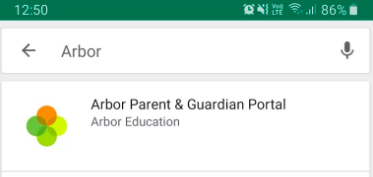
Go to your Play store and search for ‘Arbor’. Click the top option.
Screenshot_2021-05-12_at_09.24.12.png


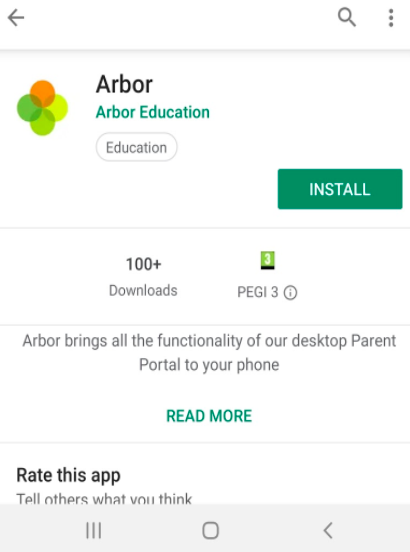
Click Install to download the Arbor App. Once it has installed, click Open.
Screenshot_2021-05-12_at_09.27.31.png

iOS

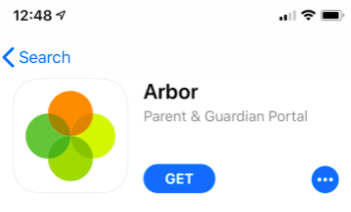
Go to your App Store and search ‘Arbor’. Click the top option. Click Get to download the Arbor App.
Screenshot_2021-05-12_at_09.28.23.png

  • Enter your email address.
  • Enter the password you set when you first registered. If you have forgotten your password, click ‘Forgot your password’ and enter your email address. You will then receive an email with a link to click to reset your password.

Being A Guardian For Multiple Children

If you are the Primary Guardian for more than one child in the school, you can access and view each child through the same portal by clicking on the name at the drop-down menu with the children’s names in the top-left of the home page, then change sibling.
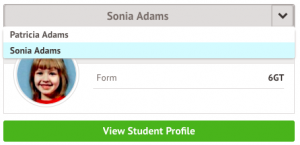
On doing this for the first time, you will need to enter your other child’s date of birth to access their dashboard.

Making payments

Payments (Meals)


On the main Arbor page, you will see your child’s accounts.

Click an account to see more information, or top up e.g. click ‘Meals’.
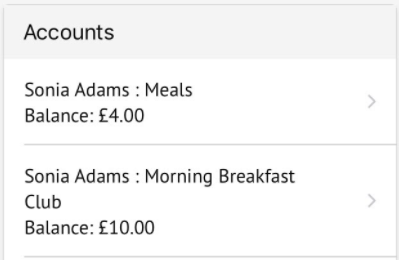
Screenshot_2021-05-19_at_15.27.32.png

Click the green button to top up the account by inputting your card details.
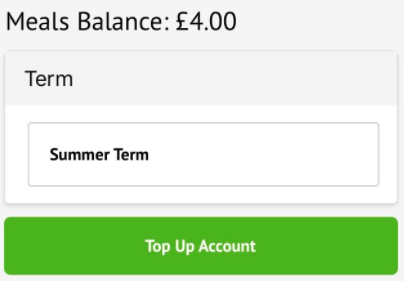
Screenshot_2021-05-19_at_15.28.32.png

Input the amount to top up, then click to pay.

Top Tip: Can’t click the button? Follow this article: I can’t click the button to pay?
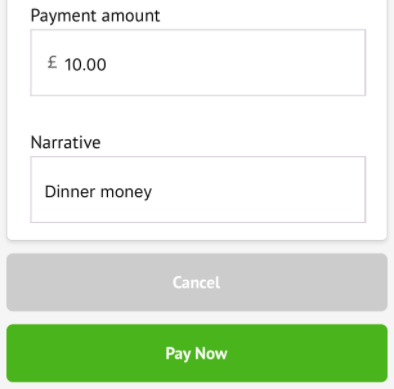
Screenshot_2021-05-19_at_15.29.23.png

Next, you’ll be able to input your card details. Please note that you must use a Visa or Mastercard, you will also have the option to pay via Apple Pay or Google Pay if using the Arbor App on your mobile phone.
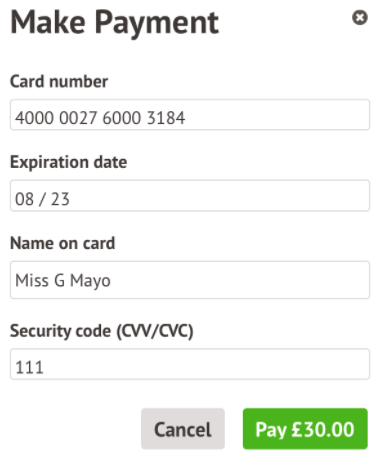
Screenshot_2021-05-19_at_15.30.00.png

You may have to then authenticate your identity for the payment to go through. This is a requirement of the recently introduced Strong Customer Authentication (SCA) regulations.

If authentication is needed for the payment, you will be prompted to authenticate the payment using the method of authentication your bank supports. This could be:

  • an SMS code
  • your mobile banking app

The payment will be completed and your card will be charged. You’ll see confirmation that the transaction has been successful.
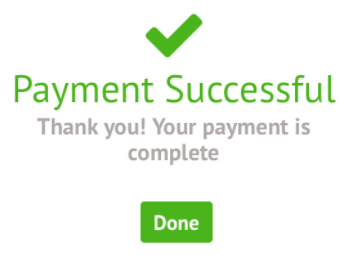
Screenshot_2021-05-19_at_15.32.24.png


Payments (Clubs)


To sign up for a club, click the menu icon at the bottom left of your screen. Select Clubs.
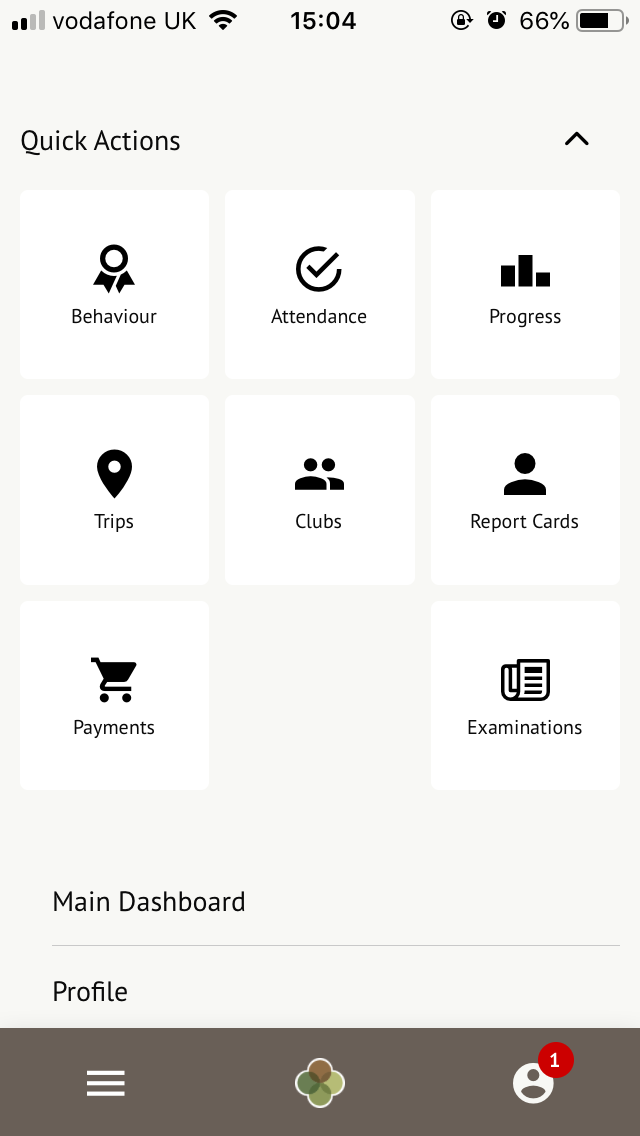
clubs_are_from_menu.png

You can then see a list of any clubs the child is currently a member of and any clubs that are currently open for them to join.

Click on the club to open up that club’s information page.
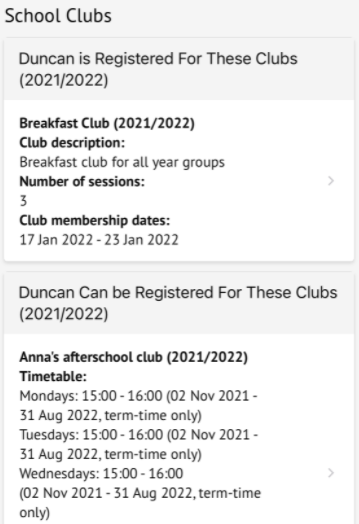
Screenshot_2022-01-17_at_17.03.35.png

Screenshot_2022-01-17_at_17.03.09.png

Click a club to access the Club Overview. Click Register For This Club to sign up.
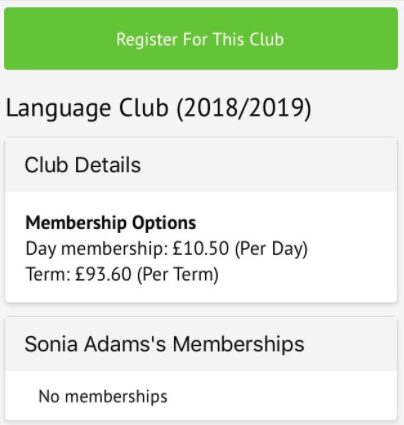
Screenshot_2021-05-19_at_14.59.17.png

Next, select the period you would like to sign up for, then click Next.
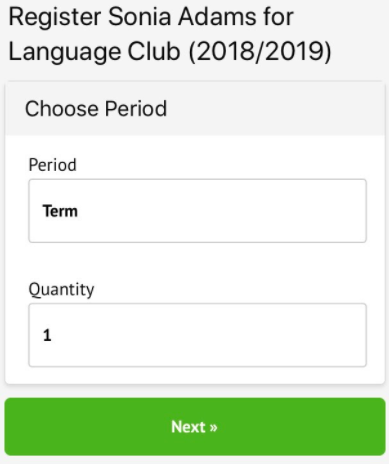
Screenshot_2021-05-19_at_14.59.51.png

Select the period you would like to sign up for, then click Next.
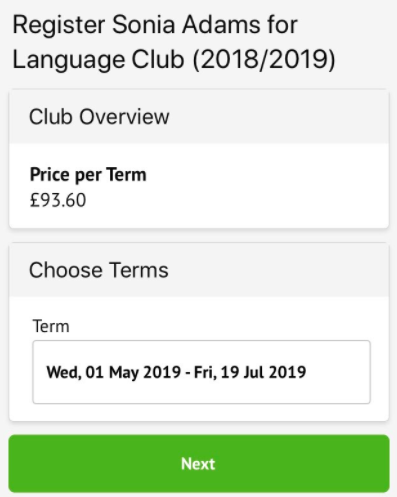
Screenshot_2021-05-19_at_15.00.30.png

On the next page, if no payment is required, you can simply sign up.
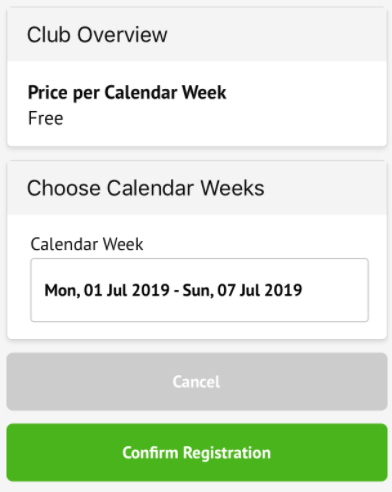
Screenshot_2021-05-19_at_15.01.15.png

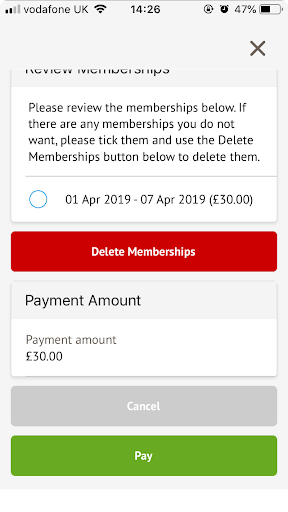
If it is a club you have to pay for, you can input your card details to pay for the club.

Top Tip: Can’t click the button? Follow this article: I can’t click the button to pay?
review_memberships.png

Please see Arbor’s help centre here for more information.

If you need any further details, please contact the School Office.

Useful Web Links

  • Active Learn Primary
  • My Maths
  • Ofsted Parent View
  • Oxford Owl Parent Guides
  • Purple Mash
  • Soccer 2000
Malins Road, Parkfields
Wolverhampton, WV4 6AW

01902 558862

[email protected]

  • Catholic Life
  • Our Curriculum
  • Pupil Performance
  • Weblinks
school logo st teresa
SGA trust Logo

Part of St Gabriel the Archangel Catholic Multi-Academy Trust is a company limited by guarantee registered in England & Wales with company number 08146661. Registered office address: c/o Painsley Catholic College, Station Road, Cheadle, Staffordshire ST10 1LH.

School website powered by Realsmart Logo